Earlier this year, LinkedIn rolled out a cool new feature for Company Pages, and if you’re managing a business profile, you’ll want to check this out. It’s called the Featured Section, and it’s a simple but powerful way to spotlight your most important posts.
With this Featured Section, LinkedIn basically gives you a space where you can pin up to three posts. It acts like a mini billboard on your Company Page, sitting right under the “About” section and above your regular posts.
Where to find it
- Switch to admin view: Hop into the admin controls of your Company Page to start making changes.
- Edit page: Look for the “Edit Page” option on the left-hand side. If the feature’s available, you might see a little “new” label. Click on it!
- Manage Featured Section: Once inside, you can start picking which posts to feature, move them around, or ditch any that aren’t working for you anymore. (At the time of writing this, the selection page is still a bit buggy, but will hopefully be fixed soon.)
- View as member: Finally check out your Company Page as a visitor would. Scroll down to see where the Featured Section pops up. Voilà!
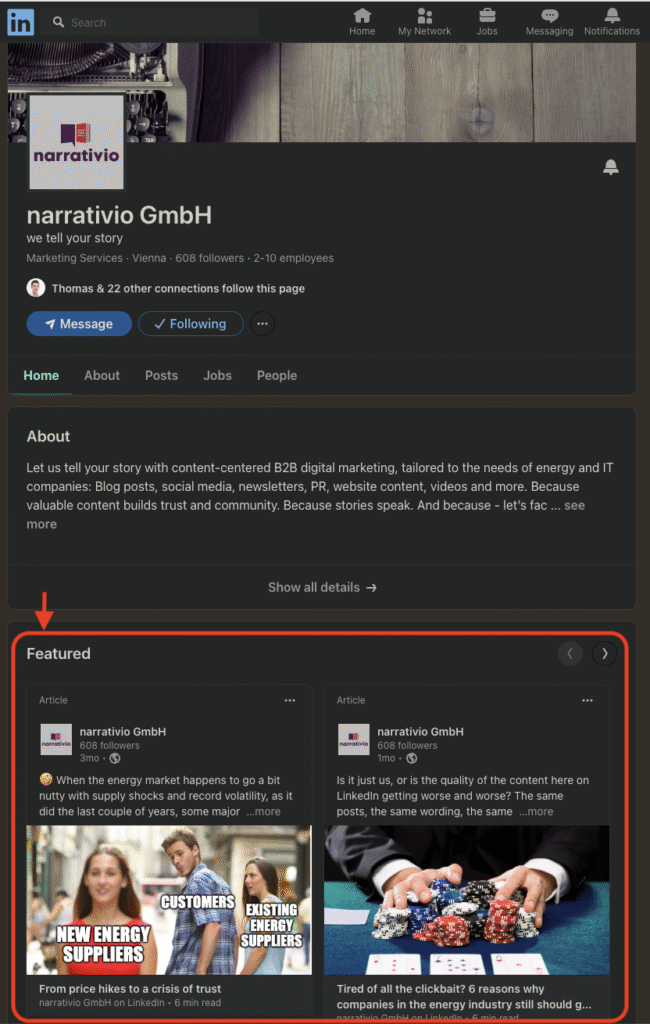
Unlike personal profiles, where you can feature all kinds of stuff like links and media, Company Pages can only feature LinkedIn posts for now. But don’t let that limit your creativity – there’s still a ton you can do.
Choosing the right posts (You can feature up to 3)
First, we recommend that you go into analytics for a better overview of the performance of each of your posts. Now, you’ve only got three slots, so choose wisely. Here are some ideas to get you started:
Cornerstone content: Start with the basics – feature content that really defines your brand. These are the posts that tell your story, explain what you’re all about, or showcase your key offerings.
High-performing posts: Dig into your analytics. Which posts got people talking? High engagement is a good sign that something’s resonating, so why not keep that momentum going by featuring it?
Important news: Got some big news to share? Maybe you’ve just landed a major deal, or you’re launching a new product. Feature that post to make sure everyone sees it front and center.
Product highlights: If your company has a few different product lines, you might want to feature one strong post for each. This way, visitors get a good snapshot of what you offer.
HR content to attract talent: Showcase what it’s like to work at your company, share employee testimonials, etc.. Especially, if you’re actively recruiting, featuring HR content is a smart move.
Your next event: Got a webinar, conference, or product launch coming up? Use the Featured Section to promote it, if you want to boost registrations or create buzz around something important.
A few tips to make it shine
Even though you can feature up to three posts, sometimes less is more. Here’s what we mean:
Keep it clean
Featuring just one or two posts can sometimes look better than cramming in all three. It keeps things focused and visually appealing.
Update regularly
Don’t set it and forget it. As your priorities shift, make sure your Featured Section reflects that. Keep it fresh!
Think visuals
Your featured posts are going to be front and center, so make sure they look good. A little attention to detail - like consistent branding or eye-catching thumbnails - can go a long way.
LinkedIn’s new Featured Section for Company Pages is a handy tool to make sure your most important content doesn’t get lost in the shuffle. By being smart about which posts you feature, you can make sure visitors to your page see exactly what you want them to. Whether you’re showcasing what makes your brand tick, highlighting a top-performing post, or sharing big news, this feature gives you a straightforward way to keep your content front and center.